Keep continuation pages with the right document
A repeated heading is not a reliable boundary. Some documents run over several pages, and a continuation page often omits its reference. PDF Batch Desk makes those pages visible so you decide where they belong, instead of finding out after the files are written.
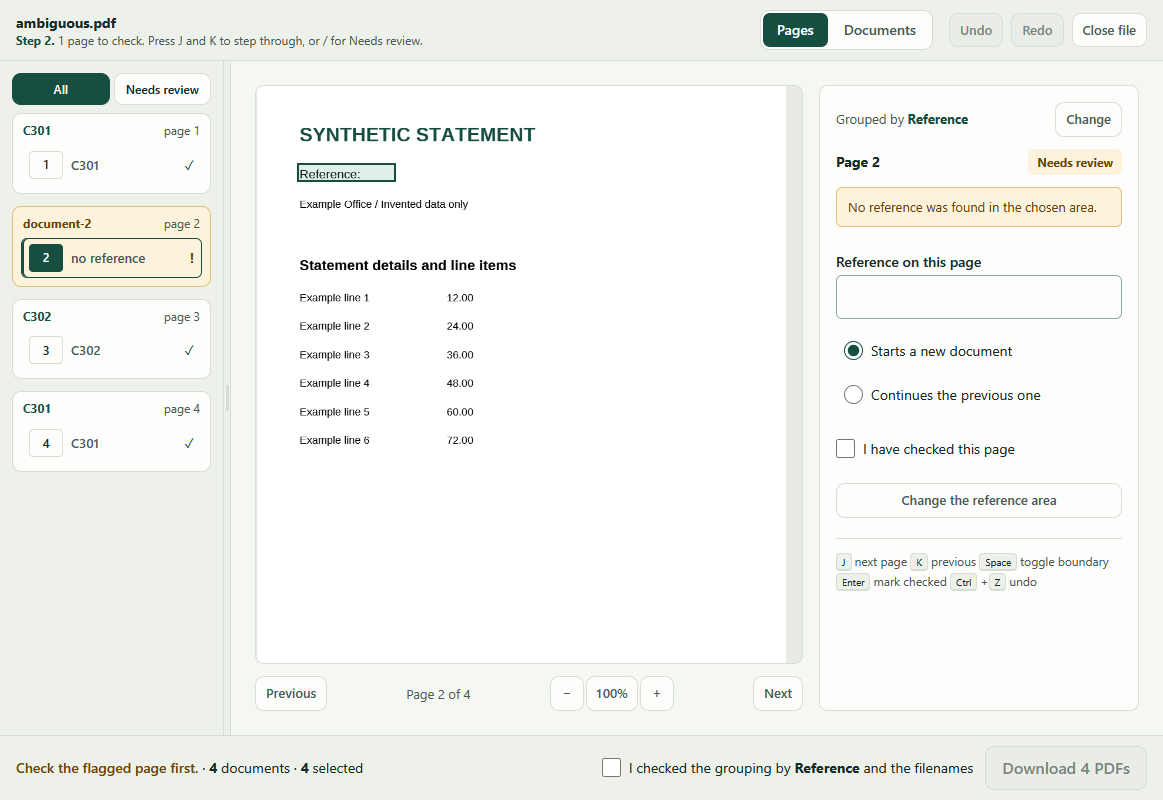
A four-page example
| Page | What is on it |
|---|---|
| Page 1 | Reference C301. |
| Page 2 | A continuation of C301, with no reference in the selected area. Flagged |
| Page 3 | Reference C302. |
| Page 4 | A separate, later document that also uses C301. |
The first suggestion flags page 2. Export stays unavailable until every flagged page is checked and you approve the groups, so a wrong boundary cannot reach your disk quietly.
If the app chose the grouping field for you rather than you picking it, the confirmation at the bottom of the window names that field, so accepting it is a decision you make rather than one made on your behalf. Automatic grouping is a proposal.
Correct the boundary
- Choose Needs review above the list, or press /, to show only the pages still to check. Each document block keeps its heading and says how many of its own pages are left. A page with no reference at all arrives flagged rather than quietly grouped. That covers a blank separator, and one where the label is printed but the value is missing.
- Click the flagged page. Its preview stays on screen while you work, and the panel beside it says why it was flagged.
- Choose Continues the previous one to join it to the document before it, or press Space.
- Tick I have checked this page, or press Enter, once you have confirmed the content and the boundary.
Every change can be undone with Ctrl+Z, so it is safe to try a boundary and reverse it.
Check the repeated name
The result is three documents: C301.pdf for pages 1–2, C302.pdf for page 3, and C301 (2).pdf for page 4. References that repeat but are not adjacent stay separate, and the visible numbered suffix prevents one file from overwriting another.
Page accounting proves allocation, not correctness. The app guarantees that each source page appears in exactly one document, in order. It cannot know whether the boundary itself is right. Check the actual contents before exporting.
When to adjust the reference area instead
If several lines fall inside your selection, or a page is a different shape from the first, the panel says so. Use a smaller area around the reference, or set the values manually under Set the area with the keyboard.
If the file is scanned-only, this version is not suitable. Do not force an unreadable file through the workflow.
Next
See the same controls used on a full statement pack, or try the review flow on your own file.